One of the longest-running projects I worked on at CBS News was a comprehensive redesign of the web navigation. The process unfolded over many years, and launched in phases.
In this case study:
- The Final Navigation Redesign
- Sticky Nav Behavior
- Prototype
- Show & Local navigation
- Secondary Flyouts
- Exploration: Nav Menu Redesign
- Exploration: Pointer Devices
The Final Navigation Redesign Case Study
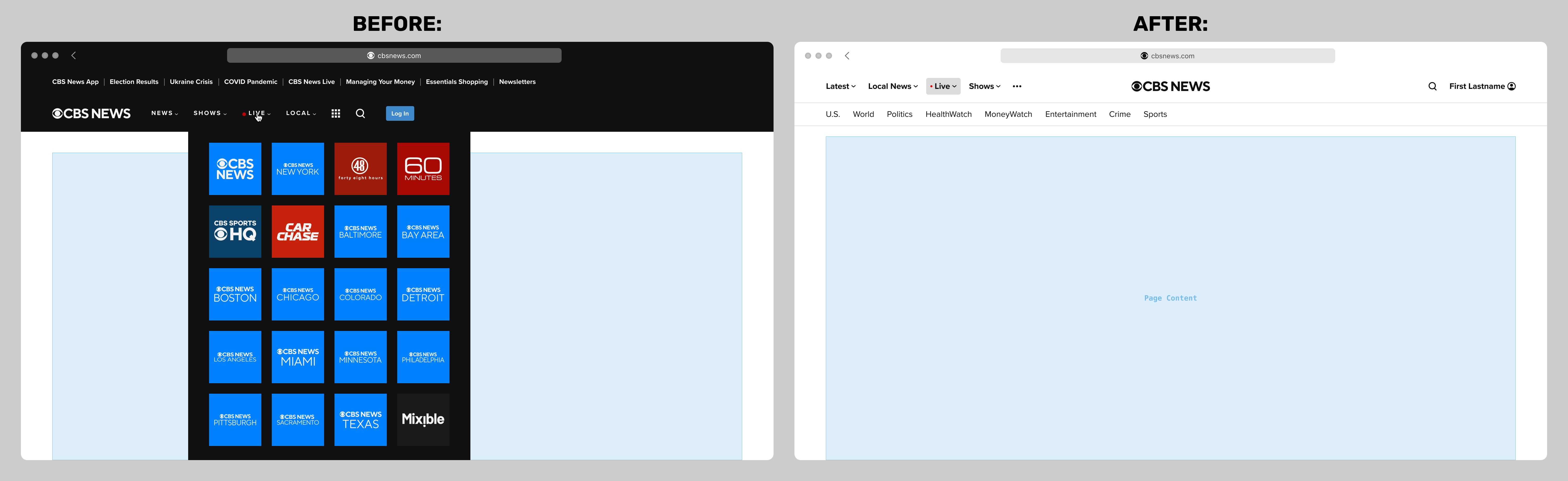
Below are before-and-after mocks of the final navigation redesign, shown at the widest breakpoint:
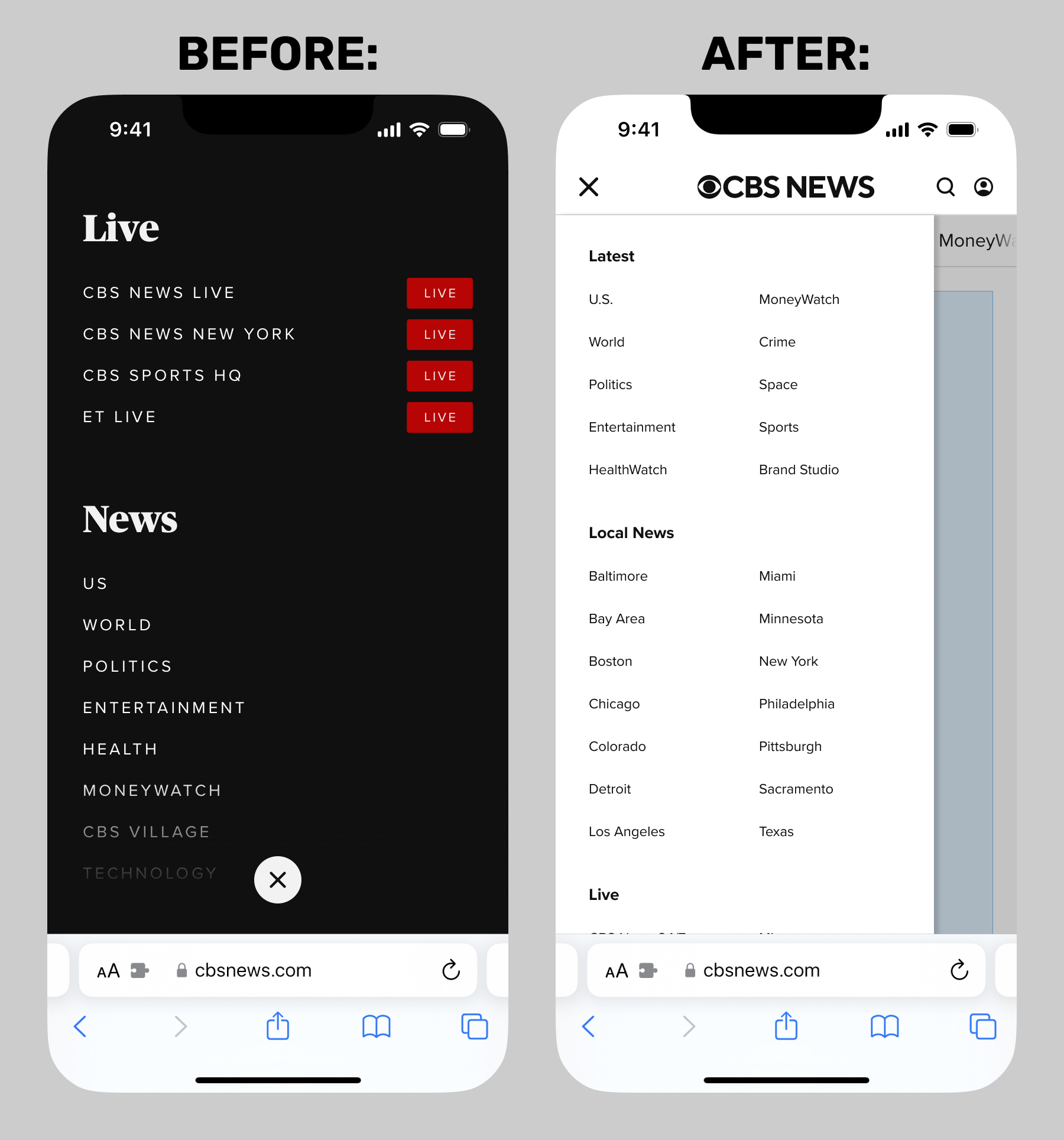
At the smallest breakpoint, the menu was much improved over the prior version, but launched in the minimum-viable-product state shown on the right below. I describe the efforts to enhance it later in this case study.
Sticky Nav Behavior Case Study
The topic of sticky navigation was hotly debated. My unpopular opinion was that the navigation component of almost any website is among the least important aspects of a page, and when scrolled, should get out of the way. (I am aware that at this time of writing, this very portfolio site has a sticky nav, and believe me, I'm still debating with myself over it!)
My preferred sticky behavior was that the CBS News nav should scroll out of view when the user is scrolling down, but slide back into view when scrolling back up. I presented The New Yorker website as an representative news media example. I was the lone advocate for this feature, and was loudly and emphatically outvoted.
Below is a screen recording of my prototype demonstrating this advanced sticky nav. This prototype also includes my reverse-engineered simulation of a skybox ad, which was a major roadblock to everything to with the navigation, not only the sticky behavior.
Prototype Case Study
Below is a screen recording of my final responsive prototype. As with almost all my prototypes, this was intended to illustrate a few points difficult or impossible to convey in static Figma or Sketch mocks, such as the responsive behavior, hover styles, and the user account flyout menu. Dark mode is shown for demonstration, but was not on the product roadmap.
Show & Local Navigation Case Study
One of the biggest complications was how to handle CBS News local affiliates, which had once each had discrete websites of their own, but had since been folded into the main CBS News domain. The initial implementation was to shoehorn them into what we called internally the "show door" template, with a customized version of the primary navigation. The result was disastrous, and was difficult to untangle. I describe my design solution to this conundrum in this brand header case study.
My solution to the show and local navigation issue was to institute a three-tiered navigational structure:
- Primary nav: global, with no exceptions. Referred to internally as "national". Supports submenus.
- Secondary nav: contextual. On "national" pages, it would be an adaptation of the so-called "supernav" that had been the top tier on the previous iteration, and was primarily an SEO driver). On Show or Local pages, it would serve as their dedicated navigation. Supports submenus.
- Tertiary nav: contextual, optional. Most local affiliates required an additional tier. Thankfully, no tertiary submenus necessary.
Here are before-and-after mockups of typical show and local navigations:
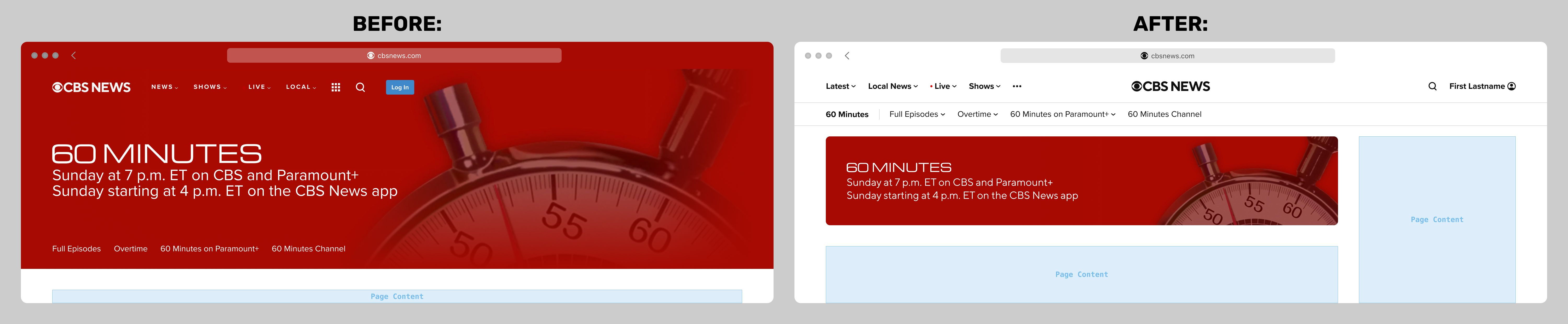
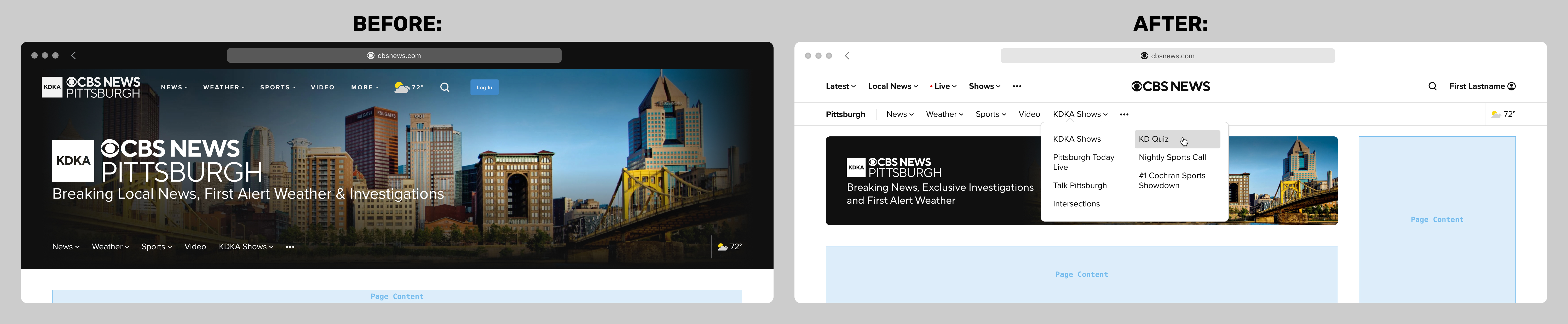
A side effect of absorbing the local affiliates into the national site meant that there must be an additional tier in the navigational tree for "local shows", for example the CBS News Pittsburgh show Talk Pittsburgh.
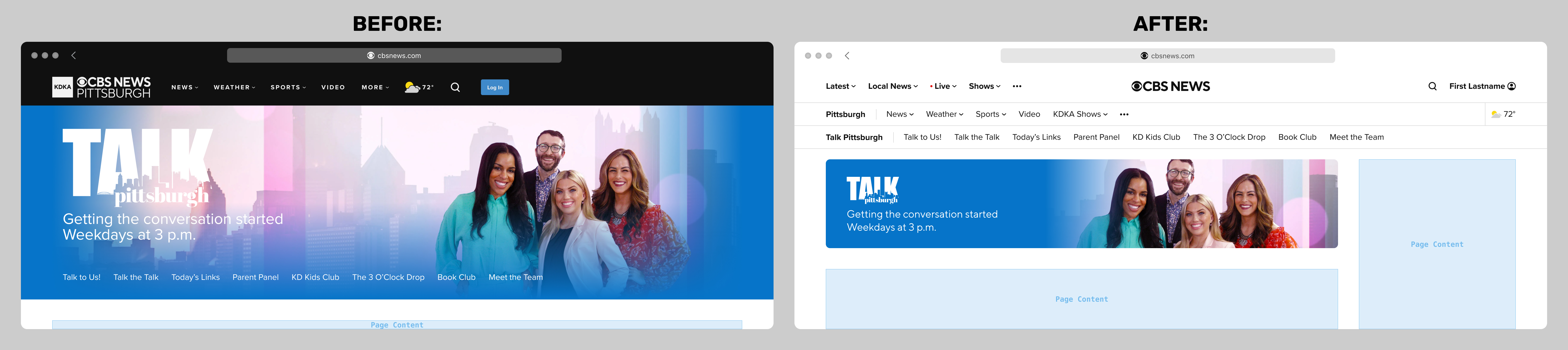
Virtually nobody within the organization liked a stacked triple navigation, but it was understood and accepted to be the only feasible solution for "local shows". The sister site to CBS News, CBS Sports, had a roughly equivalent problem for some of their particular sports coverage, such as the NFL, so we were able to commiserate and share stategies and ideas. Below is a before-and-after mockup of a local show navigation:
Secondary Flyouts Case Study
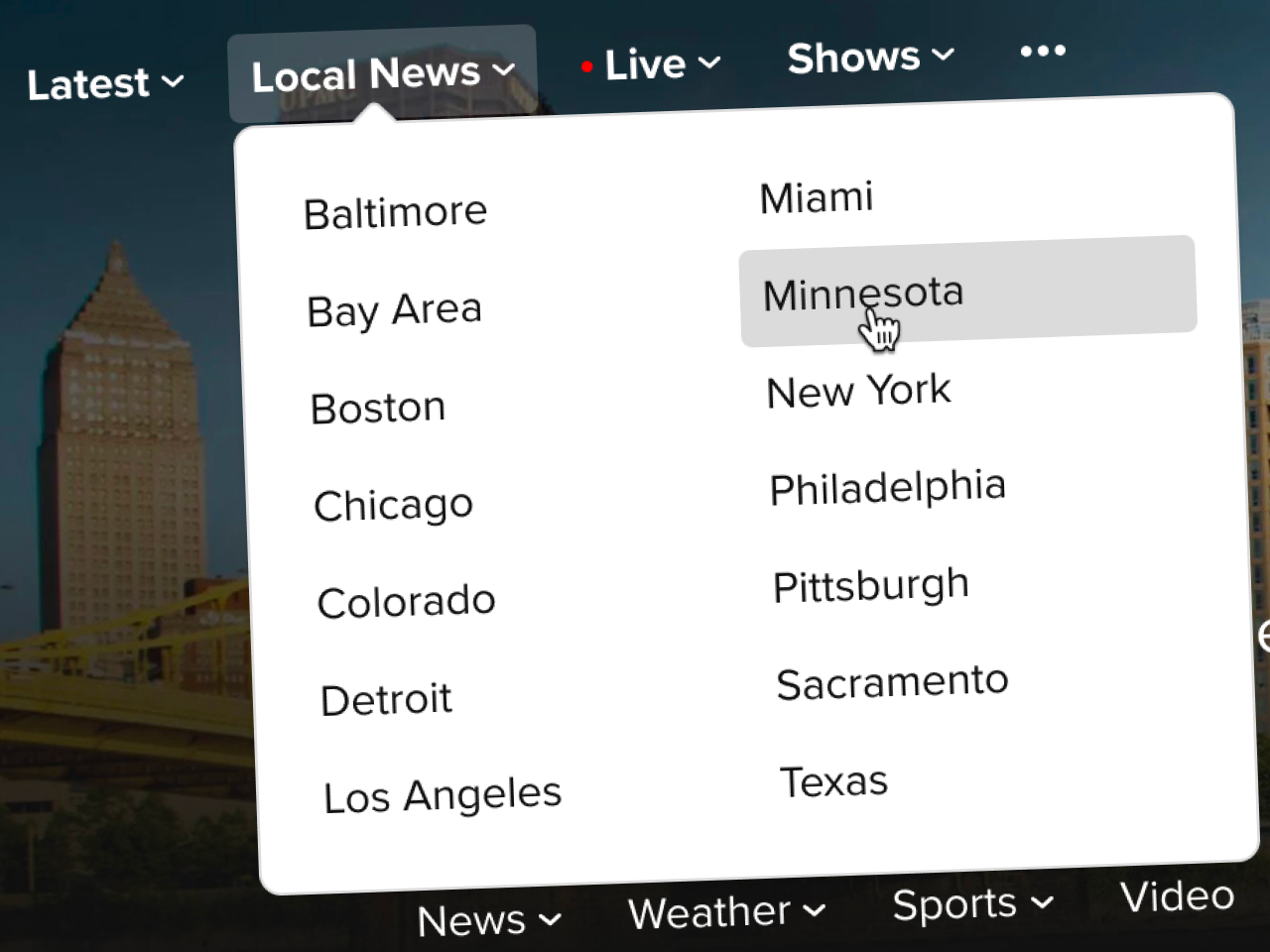
In the initial launch of the redesigned navigation, the secondary nav tier did not support flyout submenus. This issue was a legacy problem related to the local affiliates having been absorbed into the main cbsnews.com site some time prior. If I recall, there were engineering constraints around implementing this feature, and at the time it was deemed acceptable because users could tap or click on the top level item, and would be able to find what they wanted on the second-level index page. This issue only affected local affiliates (such as CBS News Pittsburgh), not shows (such as 60 Minutes) or local shows (such as Talk Pittsburgh).
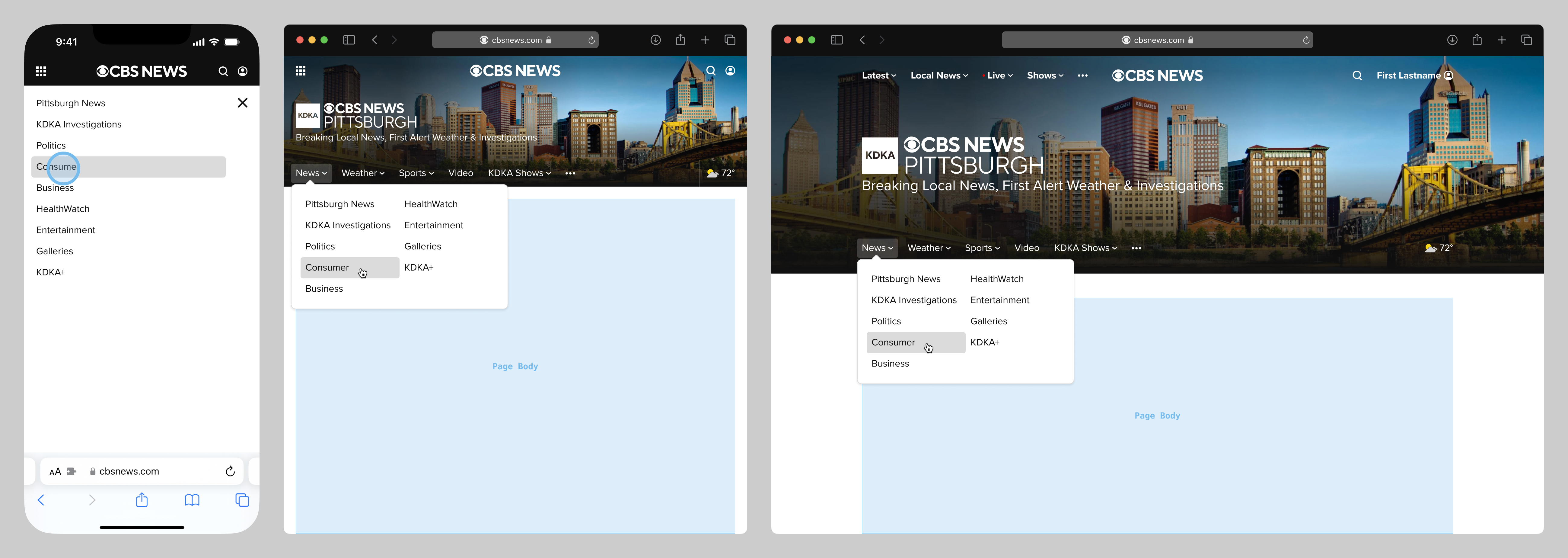
This missing feature was important to some stakeholders, so in a later revision, we added support for secondary flyouts across all breakpoints. The tricky part was solving for the smallest breakpoint, and in this particular instance, we took direction from CBS News' sister site CBS Sports. Finished mockups are below, shown at three representative breakpoints.
Exploration: Nav Menu Redesign Case Study
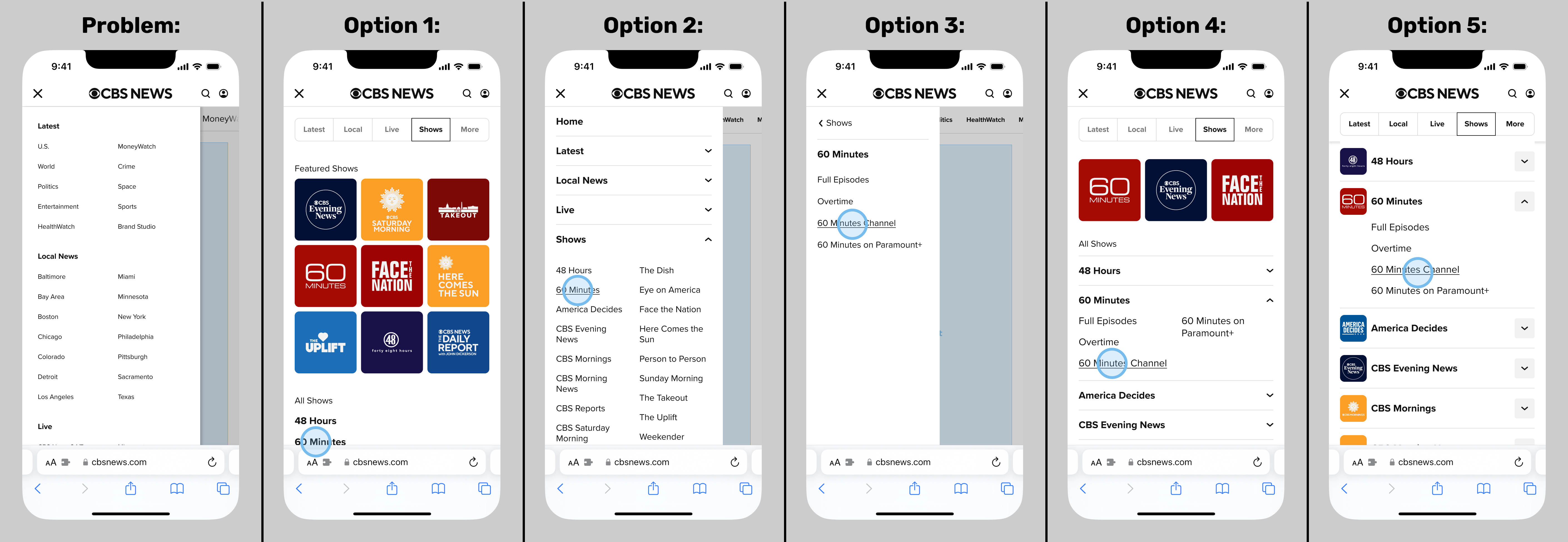
One key piece of unfinished business was the menu (aka "sidenav" or "hamburger menu"). We launched the redesign with a much-improved version, but it was in a bare-bones minimum viable product form, and desperately needed to be optimized.
It was essentially a crude sitemap, and did not provide access to the next-deeper navigational tier. For example, at smaller breakpoints, you could navigate from Home › Shows › 60 Minutes, but not from Home › Shows › 60 Minutes › 60 Minutes Channel. At wider breakpoints, you could.
So in deep collaboration with my direct supervisor and the entire CBS Design team, I put together a series of options, which you can see below. From left to right:
- The so-called "Minimum Viable Product" existing version that everyone agreed needed to be overhauled
- Options 1-2: improved, but still not allowing for navigation one tier deeper
- Option 3: an app-like menu system, deemed too complex for web
- Options 4-5: the best solutions, developed with input from my supervisor and the entire CBS Design team. Even better, these would have been a step along the path of the long-discussed merging of the CBS News and Sports websites.
These concepts did not continue beyond the exploration phase. Long story short, this project originated among the larger CBS Design team and some leadership figures, but was not a concern or priority for the CBS News product and engineering teams.
Exploration: Pointer Devices Case Study
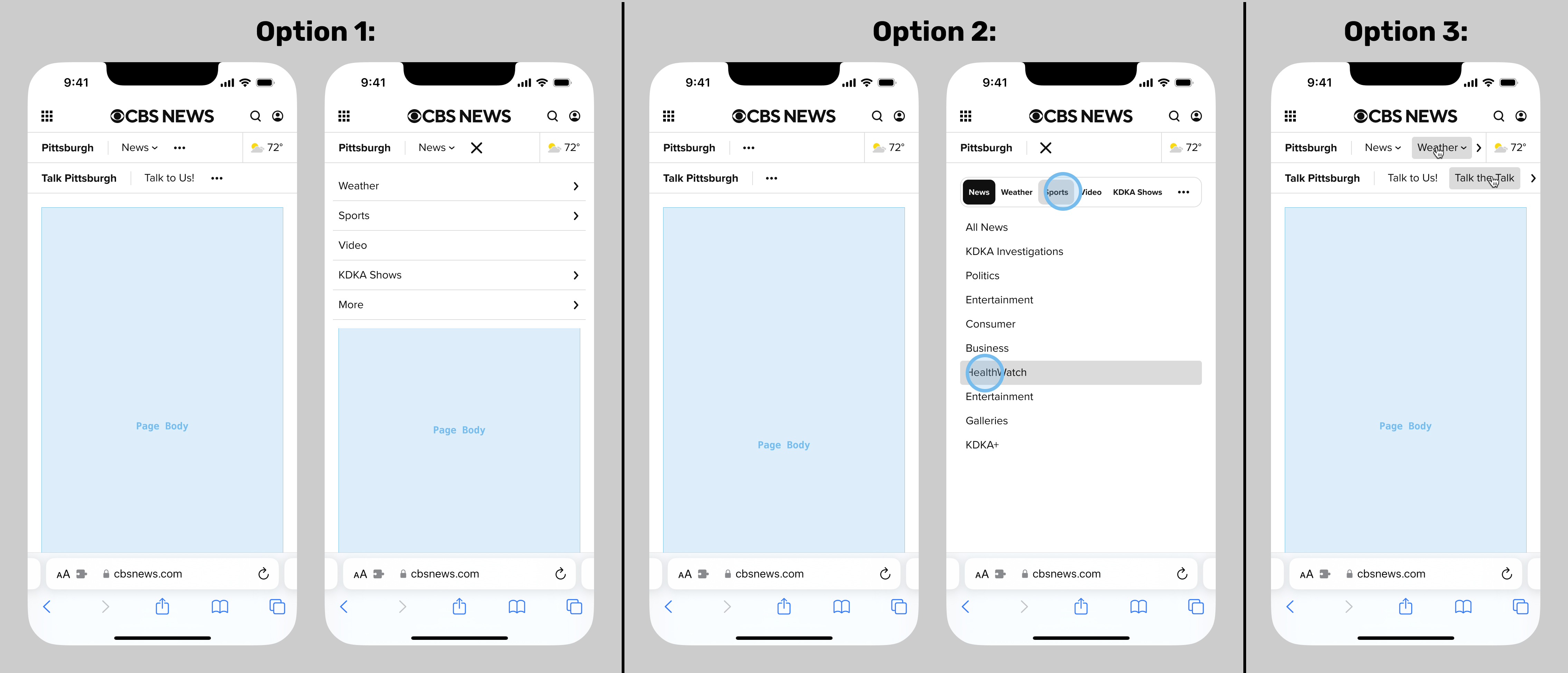
Another bit of unfinished business was a project to address an important issue: users of devices with legacy pointer devices (such as a simple mouse with no touch surface or rollerball) could not scroll the navbars horizontally, at smaller screen widths. This issue was flagged by the QA team, and was a huge blind spot for me, a habitual trackpad and touchscreen user. But in my defense, this didn't occur to anyone else either, prior to the QA process.
Below are exploratory mockups of possible enhancements. This improvement would have been for any width, but the below mocks are shown at the smallest device width for illustration. The first two options are plainly unfeasible for web, and would be bad experiences anyway. The third was generally agreed to be the best option, but wasn't yet on the roadmap when I left CBS News.