User registration is a key consideration for almost any product, but was especially sensitive for a pregnancy and fertility products like The Bump and Shine. Not only did we have to create an inviting and easy process, we had to ask personal questions of people who are pregnant or trying to conceive.
In this case study:
Shine app: User Flow Diagram
Below is a a user flow diagram, with rudimentary wireframes showing the necessary form elements and scrolled states, I put together for the Shine iOS app:

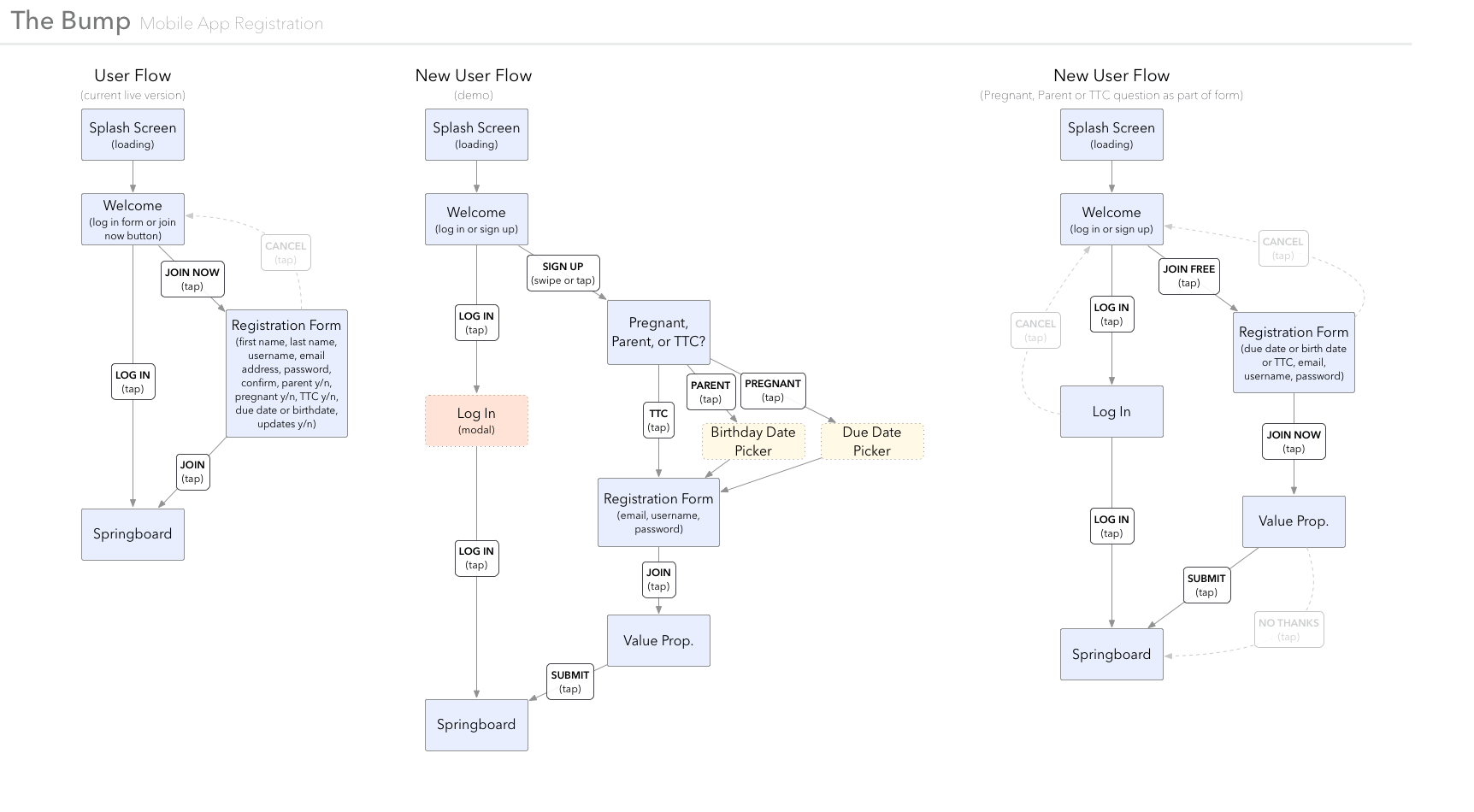
The Bump app: User Flow Diagram
Below is a a user flow diagram I put together in Omnigraffle for The Bump app, as we were mapping out a revised process of user registration. On the left is the existing flow, for comparison.
Prototype: App
Below is a clickable interactive prototype illustrating The Bump app first-launch experience, including new user registration. I built this in Flash, because I was adept in the app and could work quickly.
Prototypes: Web
Below are two clickable interactive prototypes illustrating concepts for a web version: one in a vertical panel, and another in horizontal page-wide bar.